


BLOG |
Blink announcements
A point of sale in a link: the successor to the Blink Cash Register is here, rebuilt on years of feedback from real shops, and it works with non-custodial accounts too.
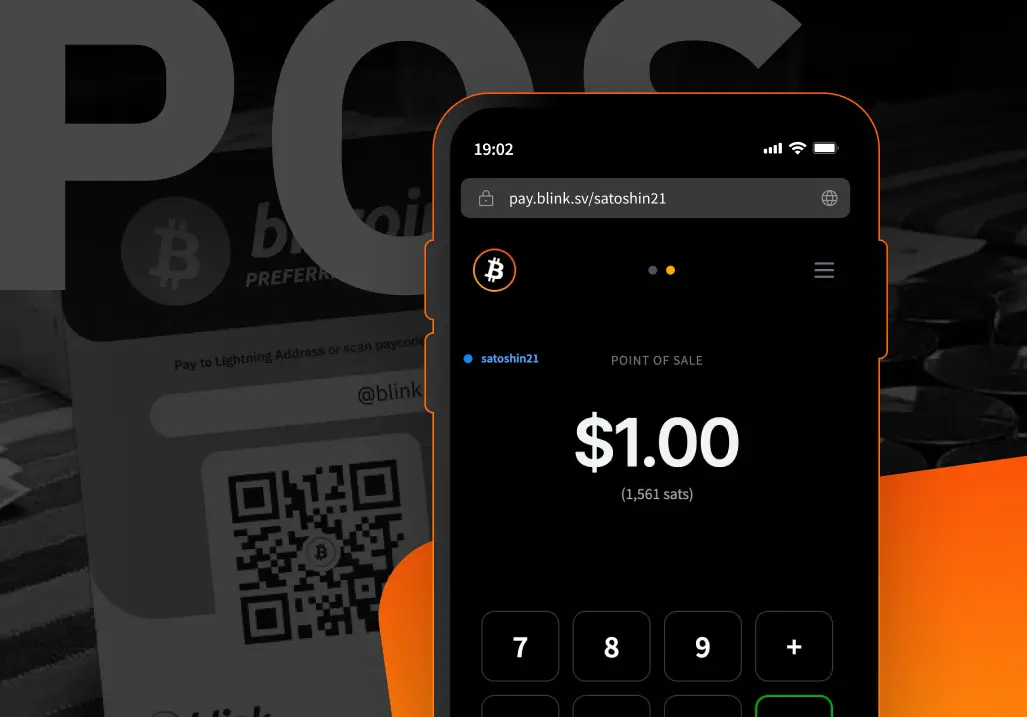


Today we’re releasing the Blink Terminal. It replaces the Blink Cash Register.
The Terminal is a web app. You open it in a browser, enter a Blink username, and start collecting Lightning payments into that user’s account. There’s nothing to install. Any device with a browser — a phone, a tablet, a laptop, a dedicated POS terminal — can run it.
Because it’s a link, the merchant can share it with employees. Three staff members on three phones can collect payments all day into the same account. None of them can see the balance or move funds out. They can only receive.
The Cash Register only worked for custodial accounts. The Terminal is its successor, built to carry those years of learning forward while extending support to both custodial and non-custodial accounts.
— Kemal, Blink
The Cash Register was popular and useful. It also didn’t get love for a long time. We shipped it years ago and then left it more or less untouched while feedback from merchants kept arriving. The biggest gap: it only worked with custodial accounts. The Terminal closes that gap and works through the rest of the backlog — every small fix and missing feature that accumulated over the years.
If you’re still on the Cash Register, your setup keeps working. We’ll wind down pay.blink.sv gradually as merchants move over.
A point-of-sale numpad should not look like a phone. Anyone who has worked a register has the layout in their hands: 7-8-9 across the top, 1-2-3 at the bottom. Phone keypads are the reverse. The Cash Register used the phone layout. The Terminal uses the register layout.
The other thing we kept hearing about was addition. A customer puts five items on the counter. The cashier knows the price of each one. On the Cash Register, the choices were to generate five separate invoices or add the numbers up mentally before typing anything. The Terminal has a plus button. Enter 4.50, hit plus, enter 3.20, hit plus, enter 2.80 — one invoice for 10.50.
The sats equivalent shows alongside the fiat amount throughout.
The way you write a number is local. In the US, a thousand and a half is 1,000.50. In Germany, 1.000,50. In France, 1 000,50. The Terminal lets you choose your decimal and thousands separator.
Bitcoin display is a setting too. Some merchants want to see “sats.” Others want the ₿ symbol. Both are available.
There are four themes — two dark, two light — to account for different lighting at the point of sale.
The Terminal supports thermal printer receipts. On the web version, this requires a companion app called Print POS Companion.
Each receipt shows the merchant username, transaction date and time, amount, and payment hash. There’s an optional extra line — a Bitcoin quote or a piece of Bitcoin history — that the merchant can choose to print at the bottom. A small thing. Maybe an entrance to a rabbit hole.
A pattern we see across merchant communities in the Global South: a merchant prints a QR code once, sticks it on the wall or the counter, and that’s the entire payment setup. No device to keep charged, no screen to hold up.
The Terminal supports this directly. Add /print to your Terminal URL and you get a printable static pay code.
The QR encodes the merchant’s Lightning address as an LNURL. Most wallets can scan and pay it. But LNURL support across the ecosystem is still uneven — Aqua, for instance, only added it recently. Nearly every wallet does handle a standard BOLT11 invoice, though. So the same QR carries a fallback: scan it with a regular phone camera and it opens the Terminal in a browser, where the customer can generate a BOLT11 invoice and pay with that instead. One printed code, both paths covered.
Bolt Cards work with the Terminal. The customer taps the card, confirms, payment goes through. No app on their side. This works in any Android browser. iOS does not allow NFC access from the browser, so tap-to-pay on iPhone isn’t available in the web version.
A native app is in progress. It will bring native receipt printing without the companion app, iOS NFC support for Bolt Cards, and a path toward features that the browser can’t provide.
The Terminal also has an authenticated area behind a login, which will be built out for power users: voucher creation, bulk Bolt Card setup, batch payments.
Communities have asked for more customization too — some want their Bitcoin Circular Economy project logo on the payment success screen instead of the generic checkmark. That’s on the list.
Open the Terminal in any browser. Enter your Blink username. You have a point of sale.
Key in amounts, use the plus button to stack items, show the QR. Payments arrive in the Blink account instantly.
The Terminal is open source under an MIT license.
What’s different from the old Cash Register? The Terminal has full feature parity with the Cash Register plus: an inverted numpad, a plus button for stacking items into one invoice, printable receipts, a static printable pay code, Bolt Card tap-to-pay on Android, regional number formatting, configurable Bitcoin display, four color themes, and support for non-custodial accounts.
Does it work with non-custodial accounts? Yes. Both custodial and non-custodial.
What about online payments? The Terminal is for in-person use. For websites and online stores, the Blink plugin for BTCPay Server is the better fit. It supports both account types too.
Can employees access funds through the Terminal? No. The Terminal is receive-only. Staff can create invoices and collect payments but cannot see or move the balance.
Do customers need Blink to pay? No. Any Lightning wallet works. The static pay code includes a BOLT11 fallback for wallets that don’t support LNURL.
Do I need to install anything? The Terminal runs in the browser. The only optional install is Print POS Companion, if you want thermal receipts on the web version.
Start receiving and sending bitcoin now


